Integrate external data
Generate pages from a visual template and external data
Create one visually editable template page in React Bricks and generate many dynamic pages by passing args into getExternalData.
In this how-to, you'll learn a very powerful external-data pattern for React Bricks.
Instead of creating one React Bricks page for every external item, you create just one visually editable template page, and then reuse it to render many dynamic pages.
This is very useful when your real data already lives in an external system, such as:
- an ecommerce platform with products
- a booking or travel API
- a PIM or ERP
- a legacy backend
So instead of syncing thousands of pages into React Bricks, you keep the data in the external source and use React Bricks only for the visual template and editorial content.
This is a perfect use case for args in getExternalData.
Docs reference: Get data from external APIs
What we'll build
We'll create a Pokemon example:
- a small API wrapper for the Pokemon API
- a
templatepage type withgetExternalData(page, args) - 4 custom bricks that render a Pokemon details page
- one visually editable
pokemon-templatepage in React Bricks - one dynamic frontend route at
/pokemon/[slug]
The important idea is this:
- in React Bricks, we only create one entity page:
pokemon-template - on the frontend, we can render
/pokemon/pikachu,/pokemon/dragonite, and many more - each route passes a different
namethroughgetExternalDataArgs - the same React Bricks template is reused, but the external data changes
Here, "template" means a visually editable page reused for many dynamic routes. It is different from the template: slot API covered in Create a page template.
Why this pattern is useful
This approach is especially useful when you don't want to:
- create one page per product or entity in React Bricks
- keep those pages in sync with an external catalog
- duplicate data that already exists elsewhere
Instead, editors work on one reusable page composition, and developers decide which external entity to render by passing args.
In an ecommerce project, this means:
- product data still comes from the commerce backend
- React Bricks controls the layout and editorial content around that data
- product pages can be generated dynamically without managing one CMS page per product
For real-world commerce examples, see:
1. Create a Pokemon API wrapper
First, create a helper file such as react-bricks/pokemon.ts.
This file fetches a Pokemon from the public API and transforms the response into a simpler shape for our bricks.
type Pokemon = {
  id: number
  name: string
  types: { type: { name: string } }[]
  height: number
  weight: number
  imageUrl: string
  abilities: { ability: { name: string } }[]
  moves: { move: { name: string } }[]
  stats: { base_stat: number; stat: { name: string } }[]
}

async function fetchPokemon(name: string): Promise<Pokemon> {
  const response = await fetch(
    `https://pokeapi.co/api/v2/pokemon/${name || 'pikachu'}`
  )

  if (!response.ok) {
    throw new Error(response.statusText)
  }

  const pokemon = (await response.json()) as Pokemon

  return pokemon
}

type SimplifiedPokemon = {
  id: number
  name: string
  types: string[]
  height: number
  weight: number
  imageUrl: string
  abilities: string[]
  moves: string[]
  stats: { name: string; value: number }[]
}

export const getPokemon = async (name: string) => {
  const pokemon = await fetchPokemon(name)

  const myPokemon: SimplifiedPokemon = {
    id: pokemon.id,
    name: pokemon.name,
    types: pokemon.types.map((type) => type.type.name),
    height: pokemon.height / 10,
    weight: pokemon.weight / 10,
    imageUrl: `https://img.pokemondb.net/artwork/large/${pokemon.name}.jpg`,
    abilities: pokemon.abilities.map((ability) => ability.ability.name),
    moves: pokemon.moves.map((move) => move.move.name),
    stats: pokemon.stats.map((stat) => ({
      name: stat.stat.name,
      value: stat.base_stat,
    })),
  }

  return myPokemon
}
This gives us one clean function:
getPokemon(name)which returns all the data needed by our bricks.
2. Create a template page type
Now create a page type that fetches external data with getExternalData.
The important part is that the function uses args.name.
Docs reference: Page Types
const pageTypes: types.IPageType[] = [
  // ...
  {
    name: 'template',
    pluralName: 'templates',
    defaultLocked: false,
    defaultStatus: types.PageStatus.Published,
    getDefaultContent: () => [],
    getExternalData: (page, args) => {
      if (!args) {
        return getPokemon('pikachu')
      }
      return getPokemon(args.name)
    },
    isEntity: true,
  },
  // ...
]
This means:
- if no
argsare passed, the template usespikachu - if
args.nameis passed, it loads that Pokemon instead
So the same React Bricks page can render different external entities depending on the runtime args.
The page type signature is:
getExternalData?: (page: Page, args?: any) => Promise<Props>As in the previous guides:
pageis the current page objectargsis optional extra runtime data passed fromfetchPage
In this pattern, args is usually the bridge between your dynamic route params and your external API call.
We also set:
isEntity: trueso this page type appears under the Entities tab in the editor. That makes sense because we are using it as a reusable template entity rather than a normal content page.
3. Create the Pokemon bricks
Now let's create the 4 bricks used by the visual template.
All of them receive the shared external data from the page type using mapExternalDataToProps.
Docs reference: Use data fetched at Page level
PokemonHeader/PokemonHeader.tsx
import Image from 'next/image'
import React from 'react'
import { types } from 'react-bricks/rsc'

import imgPreview from './pokemon_header.png'

interface PokemonHeaderProps {
  bgColor: types.IColor & { className: string }
  id: number
  name: string
  height: number
  weight: number
  imageUrl: string
  types: string[]
}

const PokemonHeader: types.Brick<PokemonHeaderProps> = ({
  bgColor,
  id,
  name,
  height,
  weight,
  imageUrl,
  types,
}) => {
  if (!id || !name || !height || !weight || !imageUrl) {
    return null
  }
  return (
    <section className={`py-8 ${bgColor?.className}`}>
      <div className="max-w-3xl mx-auto flex gap-x-12">
        <div
          className={`bg-white p-5 rounded-3xl outline-slate-500/5 ${
            bgColor?.color !== 'white' ? 'outline' : ''
          }`}
        >
          <Image
            alt=""
            src={imageUrl}
            width={500}
            height={500}
            className="w-72"
          />
        </div>
        <div className="flex-1">
          <div className="mt-12 text-lg text-pink-600 uppercase tracking-widest font-bold mb-2">
            #{id}
          </div>
          <h1 className="text-5xl text-gray-950 font-extrabold mb-6 capitalize">
            {name}
          </h1>

          <ul className="flex items-center flex-wrap gap-x-2">
            {types?.map((type) => (
              <li
                className="py-0.5 px-2 font-semibold rounded-lg bg-blue-200 text-blue-950 capitalize"
                key={type}
              >
                {type}
              </li>
            ))}
          </ul>
        </div>
      </div>
    </section>
  )
}

PokemonHeader.schema = {
  name: 'pokemon-header',
  label: 'Pokemon Header',
  previewImageUrl: imgPreview.src,
  getDefaultProps: () => ({
    bgColor: {
      color: 'white',
      className: 'bg-white',
    },
  }),
  mapExternalDataToProps: (externalData) => {
    return externalData
  },
  sideEditProps: [
    {
      name: 'bgColor',
      label: 'Background Color',
      type: types.SideEditPropType.Select,
      selectOptions: {
        display: types.OptionsDisplay.Color,
        options: [
          {
            value: {
              color: 'white',
              className: 'bg-white',
            },
            label: 'White',
          },
          {
            value: {
              color: '#f9fafb',
              className: 'bg-gray-50',
            },
            label: 'Gray',
          },
          {
            value: {
              color: '#f0f9ff',
              className: 'bg-blue-50',
            },
            label: 'Blue',
          },
          {
            value: {
              color: '#f7fee7',
              className: 'bg-lime-50',
            },
            label: 'Lime',
          },
        ],
      },
    },
  ],
}

export default PokemonHeader
PokemonDetails/PokemonDetails.tsx
import React from 'react'
import { types, Text } from 'react-bricks/rsc'

import imgPreview from './pokemon_details.png'

interface PokemonDetailsProps {
  heightTitle: types.TextValue
  weightTitle: types.TextValue
  abilitiesTitle: types.TextValue
  bgColor: types.IColor & { className: string }
  height: number
  weight: number
  abilities: string[]
}

const PokemonDetails: types.Brick<PokemonDetailsProps> = ({
  heightTitle,
  weightTitle,
  abilitiesTitle,
  bgColor,
  height,
  weight,
  abilities,
}) => {
  return (
    <section className={`py-8 ${bgColor?.className}`}>
      <div className="max-w-3xl mx-auto grid grid-cols-2 gap-6">
        <div
          className={`rounded-2xl p-6 border-blue-100 ${
            bgColor?.color === 'white' ? 'bg-blue-50' : 'bg-white border'
          }`}
        >
          <Text
            propName="heightTitle"
            value={heightTitle}
            placeholder="Title for Height..."
            renderBlock={({ children }) => (
              <h3 className="text-sm text-blue-900/70 uppercase tracking-widest font-bold mb-2">
                {children}
              </h3>
            )}
          />
          <div>
            <span className="text-3xl font-semibold">{height}</span> m
          </div>
        </div>
        <div
          className={`rounded-2xl p-6 border-blue-100 row-span-2 ${
            bgColor?.color === 'white' ? 'bg-blue-50' : 'bg-white border'
          }`}
        >
          <Text
            propName="abilitiesTitle"
            value={abilitiesTitle}
            placeholder="Type a title for types..."
            renderBlock={({ children }) => (
              <h3 className="text-sm text-blue-900/70 uppercase tracking-widest font-bold mb-2">
                {children}
              </h3>
            )}
          />
          <ul className="flex flex-col gap-y-2">
            {abilities?.map((ability) => (
              <li
                className="mt-2 py-2 px-4 text-lg font-semibold rounded-xl p-6 bg-blue-200 text-blue-950 capitalize"
                key={ability}
              >
                {ability}
              </li>
            ))}
          </ul>
        </div>
        <div
          className={`rounded-2xl p-6 border-blue-100 ${
            bgColor?.color === 'white' ? 'bg-blue-50' : 'bg-white border'
          }`}
        >
          <Text
            propName="weightTitle"
            value={weightTitle}
            placeholder="Title for Height..."
            renderBlock={({ children }) => (
              <h3 className="text-sm text-blue-900/70 uppercase tracking-widest font-bold mb-2">
                {children}
              </h3>
            )}
          />
          <span className="text-3xl font-semibold">{weight}</span> Kg
        </div>
      </div>
    </section>
  )
}

PokemonDetails.schema = {
  name: 'pokemon-details',
  label: 'Pokemon Details',
  previewImageUrl: imgPreview.src,
  getDefaultProps: () => ({
    heightTitle: 'Height',
    weightTitle: 'Weight',
    abilitiesTitle: 'Abilities',
    bgColor: {
      color: 'white',
      className: 'bg-white',
    },
  }),
  mapExternalDataToProps: (externalData) => {
    return externalData
  },
  sideEditProps: [
    {
      name: 'bgColor',
      label: 'Background Color',
      type: types.SideEditPropType.Select,
      selectOptions: {
        display: types.OptionsDisplay.Color,
        options: [
          {
            value: {
              color: 'white',
              className: 'bg-white',
            },
            label: 'White',
          },
          {
            value: {
              color: '#f0f9ff',
              className: 'bg-blue-50',
            },
            label: 'Blue',
          },
        ],
      },
    },
  ],
}

export default PokemonDetails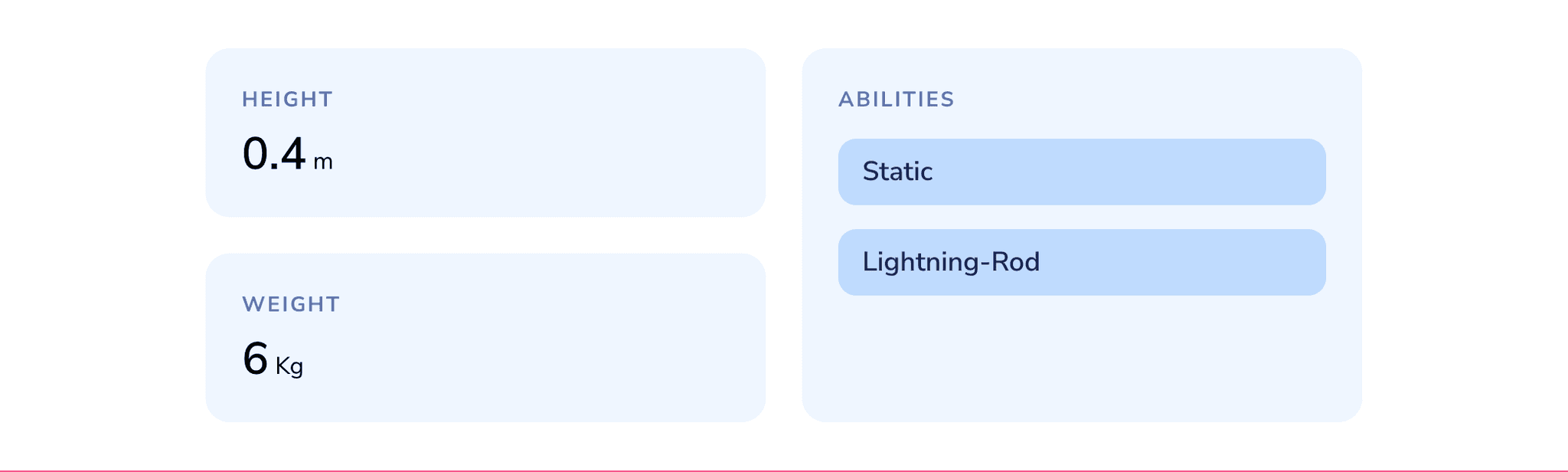
PokemonMoves/PokemonMoves.tsx
import React from 'react'
import { types, Text } from 'react-bricks/rsc'

import imgPreview from './pokemon_moves.png'

interface PokemonMovesProps {
  title: types.TextValue
  badgeColor: types.IColor & { className: string }
  maxNumber: number
  moves: string[]
}

const PokemonMoves: types.Brick<PokemonMovesProps> = ({
  title,
  badgeColor,
  maxNumber,
  moves,
}) => {
  return (
    <section className="py-8">
      <div className="max-w-3xl mx-auto">
        <Text
          propName="title"
          value={title}
          placeholder="Type a title..."
          renderBlock={({ children }) => (
            <h3 className="text-sm text-blue-900/70 uppercase tracking-widest font-bold mb-2">
              {children}
            </h3>
          )}
        />

        <div>
          <ul className="flex items-center flex-wrap gap-x-2">
            {moves?.slice(0, maxNumber).map((move) => (
              <li
                className={`mt-2 py-0.5 px-2 font-semibold rounded-lg ${badgeColor?.className}`}
                key={move}
              >
                {move}
              </li>
            ))}
          </ul>
        </div>
      </div>
    </section>
  )
}

PokemonMoves.schema = {
  name: 'pokemon-moves',
  label: 'Pokemon Moves',
  previewImageUrl: imgPreview.src,
  getDefaultProps: () => ({
    title: 'Moves',
    badgeColor: {
      color: 'blue',
      className: 'bg-blue-200 text-blue-950',
    },
    maxNumber: 200,
  }),
  mapExternalDataToProps: (externalData) => {
    return externalData
  },
  sideEditProps: [
    {
      name: 'badgeColor',
      label: 'Badges Color',
      type: types.SideEditPropType.Select,
      selectOptions: {
        display: types.OptionsDisplay.Color,
        options: [
          {
            value: {
              color: '#bfdbfe',
              className: 'bg-blue-200 text-blue-950',
            },
            label: 'Blue',
          },
          {
            value: {
              color: '#a5f3fc',
              className: 'bg-cyan-400/50 text-cyan-950',
            },
            label: 'Cyan',
          },
          {
            value: {
              color: '#fde68a',
              className: 'bg-amber-200 text-amber-950',
            },
            label: 'Amber',
          },
          {
            value: {
              color: '#f5d0fe',
              className: 'bg-fuchsia-200 text-fuchsia-950',
            },
            label: 'Fuchsia',
          },
        ],
      },
    },
    {
      name: 'maxNumber',
      label: 'Max number of moves',
      type: types.SideEditPropType.Range,
      rangeOptions: {
        min: 20,
        max: 200,
        step: 20,
      },
    },
  ],
}

export default PokemonMoves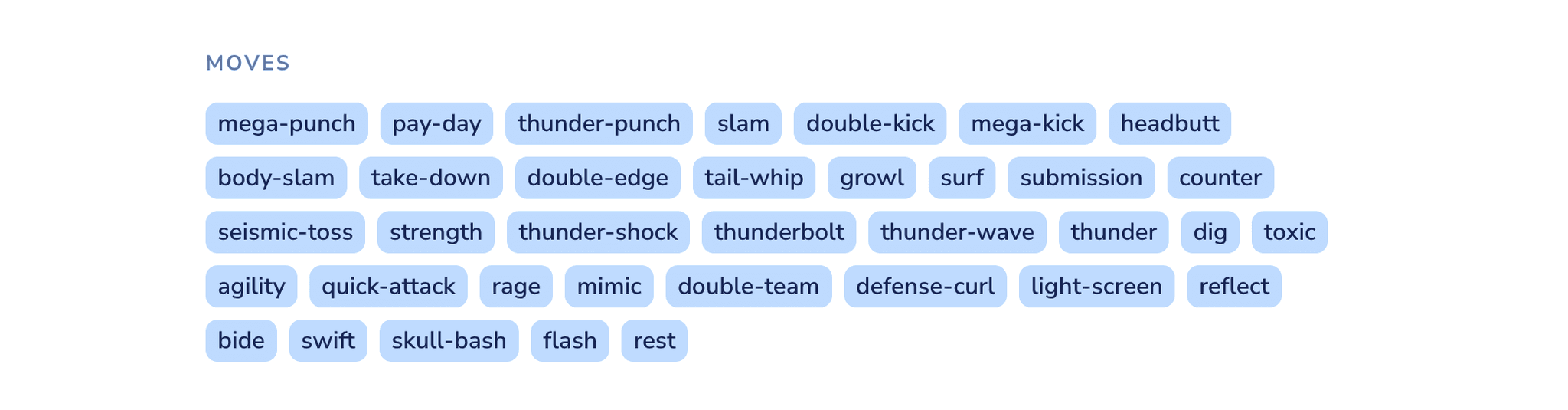
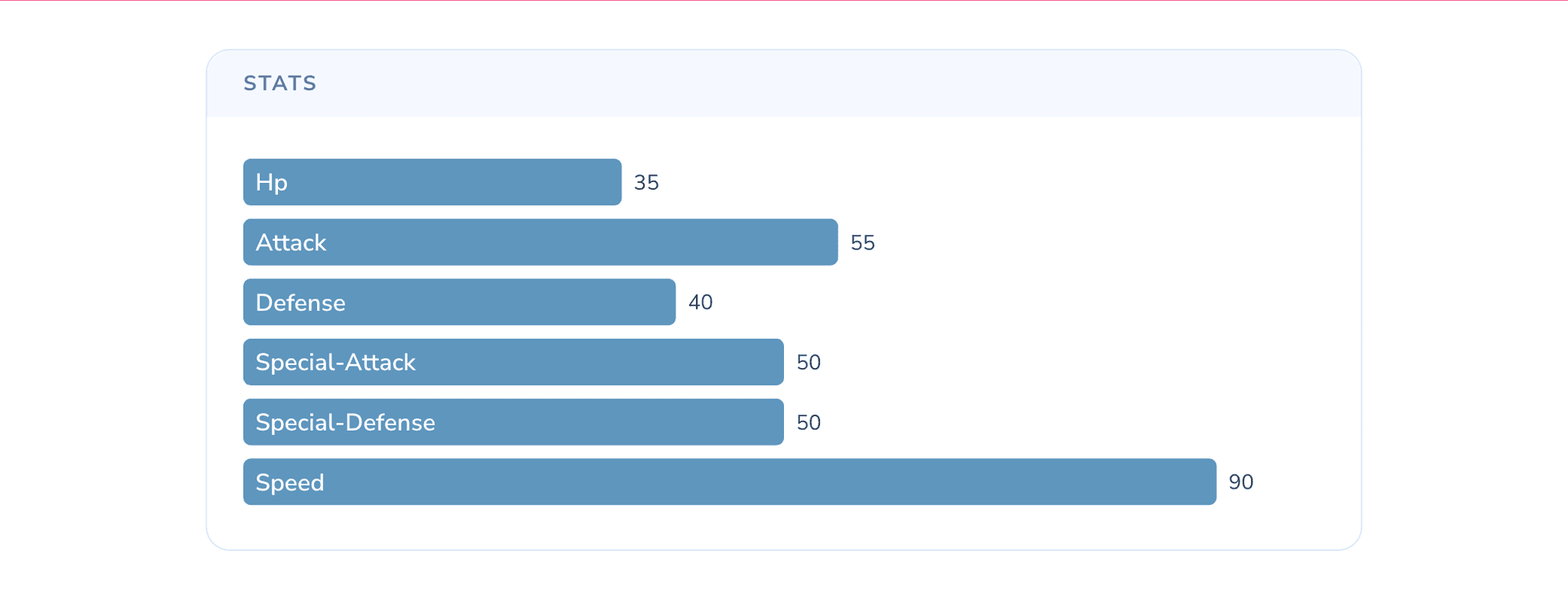
PokemonStats/PokemonStats.tsx
import { types, wrapClientComponent } from 'react-bricks/rsc'
import { RegisterComponent } from 'react-bricks/rsc/client'

import imgPreview from './pokemon_stats.png'

import {
  PokemonStatsClient,
  PokemonStatsClientProps,
} from './PokemonStatsClient'

const schema: types.IBlockType<PokemonStatsClientProps> = {
  name: 'pokemon-stats',
  label: 'Pokemon Stats',
  previewImageUrl: imgPreview.src,
  getDefaultProps: () => ({
    title: 'Stats',
    bgColor: {
      color: 'white',
      className: 'bg-white',
    },
    barColor: {
      color: '#0d9488',
      className: 'fill-teal-600',
    },
  }),
  sideEditProps: [
    {
      name: 'bgColor',
      label: 'Background Color',
      type: types.SideEditPropType.Select,
      selectOptions: {
        display: types.OptionsDisplay.Color,
        options: [
          {
            value: {
              color: 'white',
              className: 'bg-white',
            },
            label: 'White',
          },
          {
            value: {
              color: '#f0f9ff',
              className: 'bg-blue-50',
            },
            label: 'Blue',
          },
          {
            value: {
              color: '#000',
              className: 'bg-gray-950 dark',
            },
            label: 'Dark',
          },
        ],
      },
    },
    {
      name: 'barColor',
      label: 'Bar Color',
      type: types.SideEditPropType.Select,
      selectOptions: {
        display: types.OptionsDisplay.Color,
        options: [
          {
            value: {
              color: '#0d9488',
              className: 'fill-teal-700/80',
            },
            label: 'Teal',
          },
          {
            value: {
              color: '#0284c7',
              className: 'fill-sky-700/70',
            },
            label: 'Sky',
          },
          {
            value: {
              color: '#2563eb',
              className: 'fill-blue-700/70',
            },
            label: 'Blue',
          },
        ],
      },
    },
  ],
  mapExternalDataToProps: (externalData) => {
    return externalData
  },
}

export default wrapClientComponent({
  ClientComponent: PokemonStatsClient,
  RegisterComponent,
  schema,
})
PokemonStats/PokemonStatsClient.tsx
'use client'

import { useReactBricksContext, usePageValues } from 'react-bricks/rsc/client'

import { Bar, BarChart, LabelList, XAxis, YAxis } from 'recharts'

import {
  ChartConfig,
  ChartContainer,
  ChartTooltip,
  ChartTooltipContent,
} from '@/components/ui/chart'

import { types, Text } from 'react-bricks/rsc'

const chartConfig = {} satisfies ChartConfig

export interface PokemonStatsClientProps {
  title: types.TextValue
  bgColor: types.IColor & { className: string }
  barColor: types.IColor & { className: string }
  stats: { name: string; value: number }[]
}

export function PokemonStatsClient({
  title,
  bgColor,
  barColor,
  stats,
}: PokemonStatsClientProps) {
  const { isRtlLanguage } = useReactBricksContext()
  const [page] = usePageValues()
  const isRtl = isRtlLanguage({ language: page.language })

  return (
    <section className={`py-8 ${bgColor?.className}`}>
      <div className="max-w-3xl mx-auto">
        <div className="rounded-2xl border border-blue-100 dark:border-blue-200/10 bg-white dark:bg-white/5">
          <div className="rounded-t-2xl px-6 py-3 bg-blue-500/5 dark:bg-blue-200/10">
            <Text
              propName="title"
              value={title}
              placeholder="Type a title..."
              renderBlock={({ children }) => (
                <h3 className="text-sm text-blue-900/70 dark:text-white/90 uppercase tracking-widest font-bold">
                  {children}
                </h3>
              )}
            />
          </div>
          <div className="px-6 py-6">
            <ChartContainer config={chartConfig} className="w-full aspect-[3]">
              <BarChart
                accessibilityLayer
                data={stats}
                layout="vertical"
                margin={{}}
              >
                <XAxis type="number" dataKey="value" hide reversed={isRtl} />
                <YAxis
                  dataKey="name"
                  type="category"
                  tickLine={false}
                  tickMargin={10}
                  axisLine={false}
                  className="text-base capitalize"
                  hide
                />
                <ChartTooltip
                  cursor={false}
                  content={<ChartTooltipContent hideLabel />}
                />
                <Bar dataKey="value" className={barColor?.className} radius={5}>
                  <LabelList
                    dataKey="name"
                    position="insideLeft"
                    offset={8}
                    className="fill-white capitalize"
                    fontSize={16}
                    fontWeight={600}
                  />
                  <LabelList
                    dataKey="value"
                    position="right"
                    offset={8}
                    className="fill-gray-700 dark:fill-white"
                    fontSize={14}
                  />
                </Bar>
              </BarChart>
            </ChartContainer>
          </div>
        </div>
      </div>
    </section>
  )
}
These bricks show an important idea:
- the visual structure and styling live in the brick
- the actual Pokemon data is injected from the page-level external data
- editors can still customize visual and textual parts such as titles, colors, and limits
4. Create the visual template page
Now go into the visual editor and create a page called pokemon-template under the template page type.
Then compose the page using these bricks, for example in this order:
PokemonHeaderPokemonDetailsPokemonMovesPokemonStats
At this point, editors can fine-tune:
- colors
- titles
- spacing and visual composition
- how many moves to show
while the actual Pokemon data still comes from the API.
Here is what the template looks like in the editor:
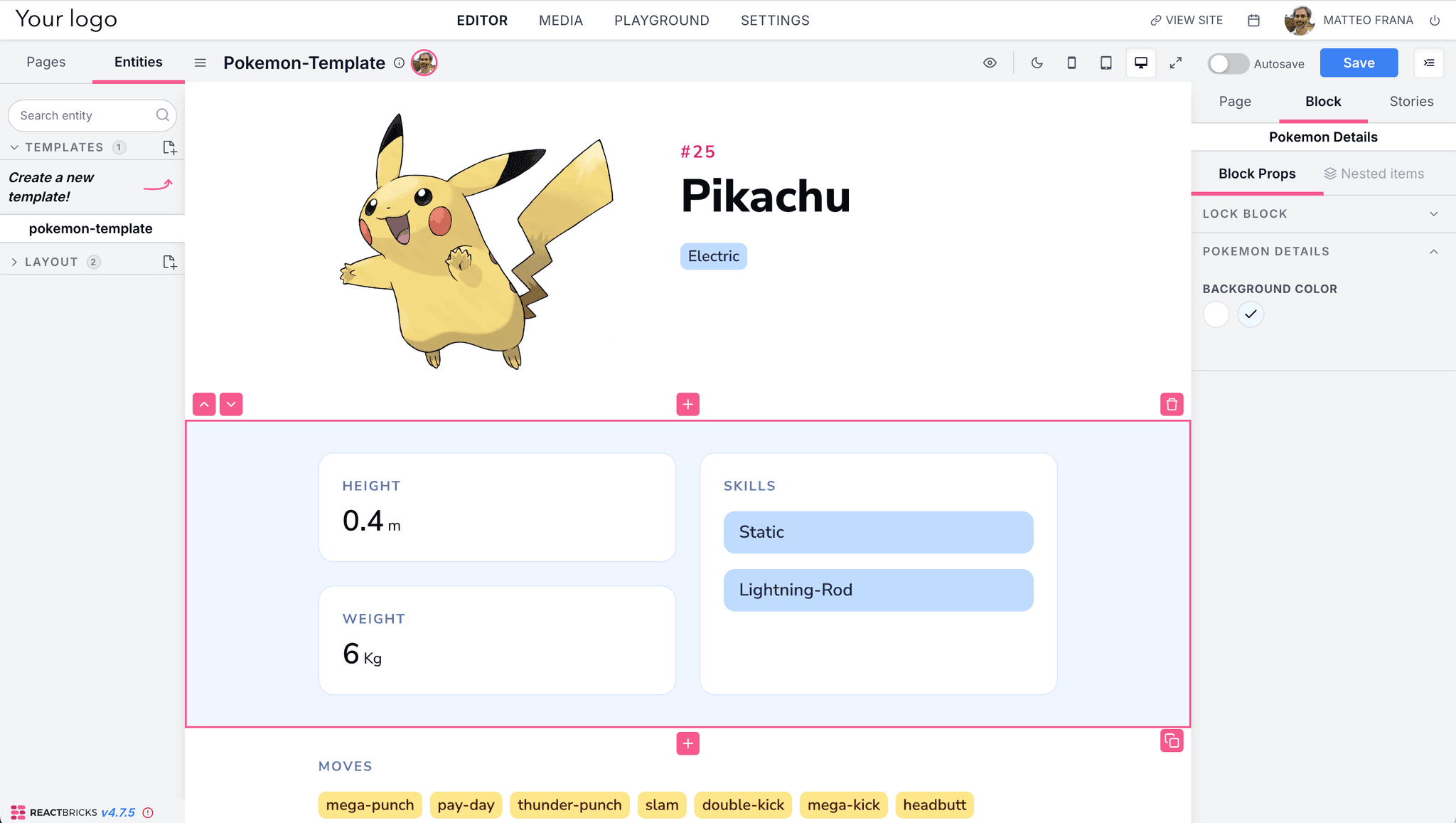
Notice the key benefit: editors are visually composing a reusable page pattern, not filling in one page per Pokemon.
5. Create the dynamic frontend page
Now create the dynamic route at app/[lang]/pokemon/[slug]/page.tsx.
This route always fetches the same React Bricks page:
slug: 'pokemon-template'but it passes a different runtime argument with:
getExternalDataArgs: {
  name: slug
}
That argument is then received by the page type getExternalData(page, args).
import type { Metadata } from 'next'
import {
  JsonLd,
  PageViewer,
  cleanPage,
  fetchPage,
  getBricks,
  types,
} from 'react-bricks/rsc'
import { ClickToEdit } from 'react-bricks/rsc/client'

import ErrorNoKeys from '@/components/errorNoKeys'
import ErrorNoPage from '@/components/errorNoPage'
import config from '@/react-bricks/config'
import { getPokemon } from '@/react-bricks/pokemon'

const getData = async (
  slug: any,
  locale: string
): Promise<{
  page: types.Page | null
  errorNoKeys: boolean
  errorPage: boolean
}> => {
  let errorNoKeys = false
  let errorPage = false

  if (!config.apiKey) {
    errorNoKeys = true

    return {
      page: null,
      errorNoKeys,
      errorPage,
    }
  }

  const page = await fetchPage({
    slug: 'pokemon-template',
    language: locale,
    config,
    fetchOptions: { next: { revalidate: 3 } },
    getExternalDataArgs: { name: slug },
  }).catch(() => {
    errorPage = true
    return null
  })

  return {
    page,
    errorNoKeys,
    errorPage,
  }
}

export async function generateStaticParams({
  params,
}: {
  params: { lang: string }
}) {
  if (!config.apiKey) {
    return []
  }

  const pokemons = await fetch('https://pokeapi.co/api/v2/pokemon?limit=100')
    .then((response) => response.json())
    .then((data) => data.results)

  type PokemonFromList = {
    name: string
  }

  const pages = pokemons.map((pokemon: PokemonFromList) => ({
    slug: pokemon.name,
  }))

  return pages
}

export async function generateMetadata({
  params,
}: {
  params: { lang: string; slug?: string }
}): Promise<Metadata> {
  const pokemon = await getPokemon(params.slug || 'pikachu')

  return {
    title: pokemon.name,
    description: `Here you can find info about the Pokemon ${pokemon.name}`,
  }
}

export default async function Page({
  params,
}: {
  params: { lang: string; slug?: string }
}) {
  const { page, errorNoKeys, errorPage } = await getData(
    params.slug,
    params.lang
  )

  const bricks = getBricks()
  const pageOk = page ? cleanPage(page, config.pageTypes || [], bricks) : null

  return (
    <>
      {page?.meta && <JsonLd page={page}></JsonLd>}
      {pageOk && !errorPage && !errorNoKeys && (
        <PageViewer page={pageOk} main />
      )}
      {errorNoKeys && <ErrorNoKeys />}
      {errorPage && <ErrorNoPage />}
      {pageOk && config && (
        <ClickToEdit
          pageId={pageOk?.id}
          language={params.lang}
          editorPath={config.editorPath || '/admin/editor'}
          clickToEditSide={config.clickToEditSide}
        />
      )}
    </>
  )
}
This line is the key:
getExternalDataArgs: {
  name: slug
}
It means:
- the route param is read from
[slug] fetchPagepasses it into the page type asargsgetExternalData(page, args)uses that arg to fetch the correct Pokemon
So /pokemon/pikachu and /pokemon/dragonite both use the same React Bricks template page, but each one gets different external data.
6. See the final result
Here is an example rendered page for Dragonite:
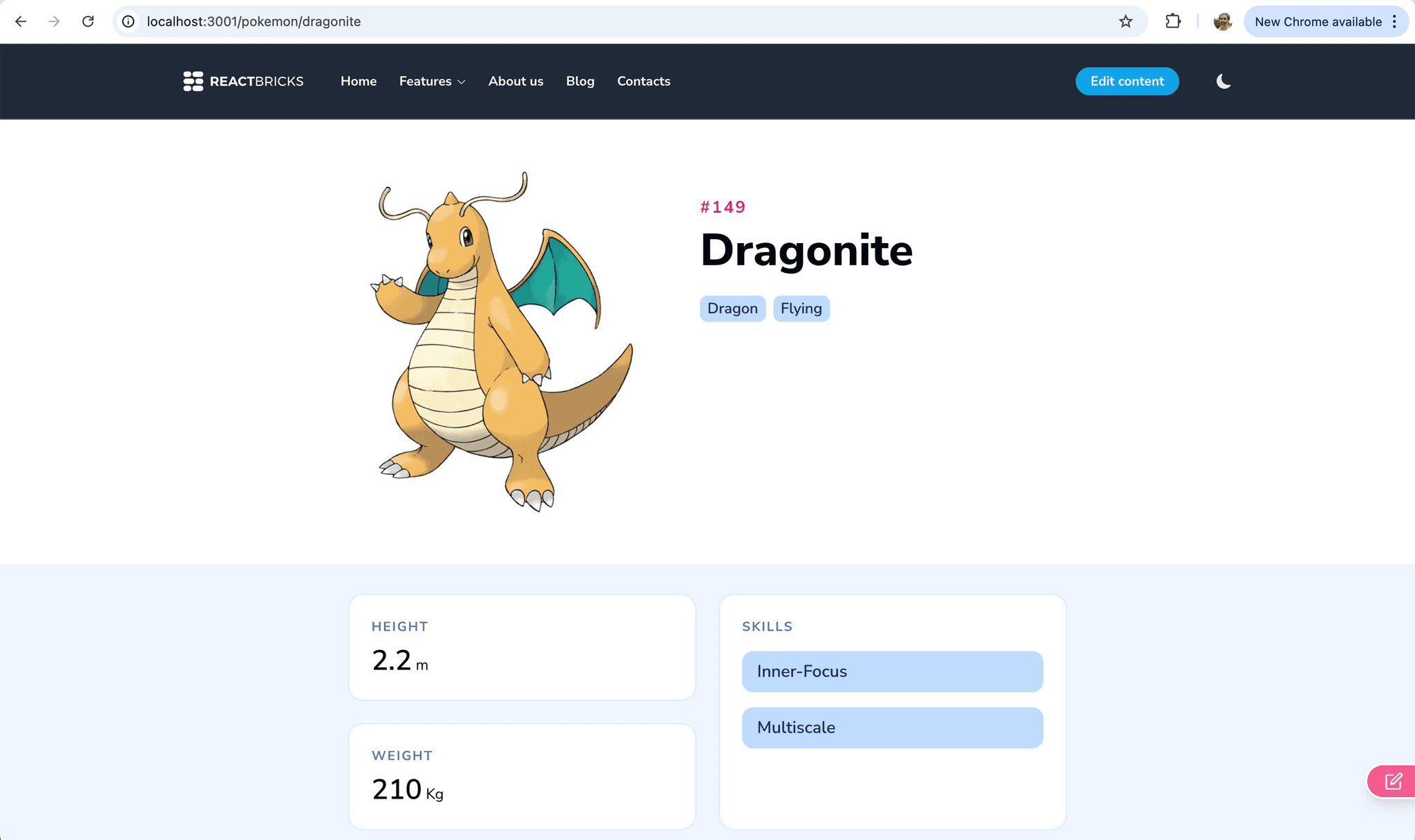
This page was not manually created in React Bricks as a separate page.
Instead:
- the layout came from the visually edited
pokemon-template - the data came from the external API
- the route parameter selected which Pokemon to render
That is exactly the same pattern you can use in ecommerce for products, categories, or product variants.
Why getExternalDataArgs is the missing piece
The previous guides showed how external data can depend on:
- brick props
- page data
This guide adds a third dimension:
- runtime route parameters
That is why args is so powerful.
With getExternalDataArgs, you can keep one reusable visual template in React Bricks, and still render many pages whose data depends on the current route.
From Pokemon to ecommerce
The Pokemon example is just a fun stand-in for a product catalog.
In a real ecommerce site, you could:
- create one
product-templatepage in React Bricks - visually compose product-specific sections with reusable bricks
- read the current product slug from the route
- pass that slug as
getExternalDataArgs - fetch the product from Shopify, Commerce Layer, BigCommerce, or another commerce API
So the editors work on one product template, while the frontend generates a full product page for every product in the catalog.
This avoids:
- duplicated page creation
- fragile synchronization between CMS pages and commerce data
- maintaining thousands of nearly identical content pages
Recap
With this pattern:
- React Bricks owns the visual template
- the external system owns the entity data
- the frontend route decides which entity to render
getExternalDataArgspasses that decision intogetExternalData
That gives you the best of both worlds:
- visual editing for marketers
- dynamic, scalable pages for developers
- no need to create one CMS page per external entity